A gentle companion
for people in care.
Sophie sits in the room and talks. She keeps residents company, answers from their own diary, prompts their medication — and records whether it actually landed. Sophie herself has no sight — the camera is only ever used for calls.
You can try her right now in your browser — meet Sophie. Type to her and she answers out loud. It is the real Sophie with an invented resident, so nothing you do reaches a real care home.
What she does
Company, and a record your team can act on
Sophie isn't a gadget to figure out. She talks and listens in plain, warm language, and everything she knows comes from that resident's own profile — so she isn't inventing a life story. Everything she does is written down where your staff can see it.
Company & chat
A warm voice to talk to at any time — say "Sophie" or tap her face. She listens, remembers what she's told, and asks gentle questions.
Asking for help
If a resident says they need help, Sophie raises an alert to staff with the exact words that caused it. Anything ambiguous is confirmed first, and a television talking about somebody else’s heart attack doesn’t page anyone — a robot that cries wolf is one whose alerts stop being read.
Diary & reminders
"What's on today?" — answered from a diary your staff keep, by voice or in the console. Nudges arrive at the right time, in her own words.
Medication, and whether it landed
She prompts, then asks. Taken, refused, unclear or no reply — each one is recorded against the resident, so the console can answer "did she take her tablets?" rather than just "we reminded her".
Wellbeing over time
Mood is sampled from how someone actually speaks and summarised by day, with a direction of travel — so a resident going quiet shows up as a trend, not a hunch.
"Worth a look"
Eight plain counting rules over what's already recorded — stopped talking, mood sliding, prompts going unanswered, a robot off the air. Each line says exactly what it counted and links to the evidence. Not a diagnosis.
We’re starting a small pilot: one or two people, with very few places.
Register interestWhat she runs on
A small companion robot, or an iPad on a stand
Sophie is the software, not the box. The brain, the profiles and the console live on the server, so a resident who moves room, or gets a replacement unit, keeps the same Sophie. Robot or iPad, it is the same face, the same voice and the same rules.
On a companion robot
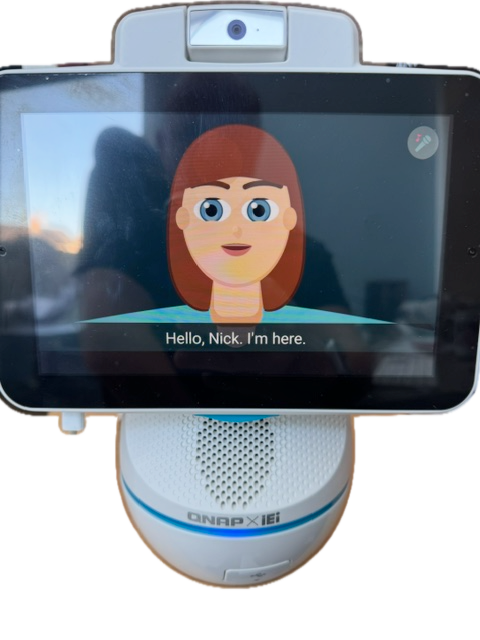
A small desk unit with a friendly animated face that lip-syncs as she talks. We set it up and bring it. It boots straight into Sophie, stays locked to her so there is nothing else to wander into, and updates itself overnight.
On an iPad
The free Sophie app turns an iPad on a stand into the same Sophie: her face fills the screen, with Phone and Calendar in the corners. The care home sets it up from the console in a couple of minutes, with no visit from us.
Swap the box, keep the companion
Nothing about a resident is kept only on the unit. A faulty one is swapped and given to the same resident in the console, and she greets them by name straight away.
Setting Sophie up on an iPad
You need the resident added in the Care Console first, and a manager's login. The setup code works once, only on that iPad, for 15 minutes.
- Install the free Sophie app on the iPad and open it.
- Tap “My care home gave me a code”. The iPad shows its own id, starting
ipad-. - In the Care Console, go to Devices → Add an iPad. Type in the id, choose the resident, and you get an eight-letter setup code.
- Type the code on the iPad. Sophie greets the resident by name, and you're done.
- Put it on a stand by their chair or bed, switch Auto-Lock off, and turn on Guided Access so the iPad stays on Sophie.
Just curious? Open the app and tap “Just looking” to meet Sophie with Peggy, a made-up resident. Nobody real is contacted.
Sophie for iPad. Free. iPad only.
What she won't do
The limits are the product
Most of the worry about putting a device in an older person's room is about what it might do when nobody's looking. So here is the list of things Sophie cannot do — not as policy, but because the capability isn't in her.
She can't see you, and the camera is only for calls
Sophie has no sight. The robot has a camera in its shell, and the only thing that ever uses it is a video call with someone on the resident’s approved list, which the resident has answered or asked for. The picture goes to the person on the call and nowhere else: Sophie is never given a frame of it, and there is no image model for her to look with. Ask her what you’re wearing and she says she can’t see, every time; she is tested against claiming otherwise. A resident never has to wonder about the thing on the table.
She isn't listening until she's asked
Nothing leaves the room until someone says "Sophie" or taps her face. Her name is recognised on the device itself — there's no open microphone streaming a bedroom to anyone, and she won't call for help off the back of a stray sentence she wasn't meant to hear.
She won't make things up
Every reply is read before the resident hears it. If she's about to claim she saw something, invent a relative, remember a conversation that never happened, say help is coming when it isn't, or offer medical advice, that answer is thrown away and replaced with an honest one. Before any update reaches a resident she's put through a long standing list of the ways a machine like this could hurt someone, and nothing ships while one of them fails.
She isn't a smart speaker, and she doesn't replace anyone
No big-tech assistant account, no shopping, no adverts, no skills store. What a resident says is transcribed on our own server, not handed to a voice platform, and resident data is never used to train models or sold on. Sophie takes the repeating bits — the prompt at eight, "what's on today", the company at three in the morning — and writes down what happened. Judgement and care stay with your staff, who now have the record.
Who can reach her
A list a nurse signs off, not a contacts app
Family contact in a care home is a safeguarding decision, so it's treated as one. Each resident has an approved list, and it is the only route in.
Approved by a named person
Only someone your care home has approved appears on a resident's list. Every approval, edit, withdrawal and restore is recorded against the person who did it, with the date — so months later you can see who allowed what.
Carers can read it, not change it
A carer can see who's on a resident's list. Adding or removing someone takes a manager. Withdrawing approval takes effect immediately — there's no cached copy anywhere to go stale.
The robot is never told a phone number
The unit in the room knows "your daughter Julie" and nothing more — no number, no email, no address. Those stay on the server. A unit that walks out of the building is not a stolen contact book.
One resident, one list
A robot only ever knows about the resident it's bound to. Not the room next door, not the rest of the home. Someone approved for their mother can see their mother, full stop.
For your team
One console, in a browser, nothing to install
Your home is set up with its own residents and its own staff accounts, and three roles keep that tidy: a manager runs the home, a carer does the day-to-day, and nobody ever sees another home's residents. This is what a manager sees when they log in:
How it works
Simple for residents, simple for staff
Add the resident
In the console: name, room, diary, reminders, what they like to talk about.
Place the unit
A robot on the bedside table, or an iPad on a stand. Wi-Fi and a plug, then give it to the resident in the console.
They talk
They say "Sophie" or tap her face — she greets them by name and takes it from there.
Your team reads it
Conversations, alerts, medication and trends, all in the console. Nothing to install.
Calling family, both ways
The approved list above is what it runs on: a resident saying "ring my daughter", and a daughter ringing the room. Voice and video calls work in both directions on our own units, including a family member's phone on 4G with the Sophie app closed: it rings like a normal call, on iPhone and Android. It is the newest part of Sophie, so if calling is what would decide it for you, ask us and we'll show you a call.
Worth saying plainly, because of the section above: a call is the only thing that ever puts the camera to use, and only once the resident has answered it or asked for it. A call never answers itself. Sophie still has no way to look at anybody.
For families
With the free Sophie Family app you can video-call your relative on their Sophie device, and they can ring you from it too.
Download on the App Store Get it on Google Play
Your relative's Sophie device can be an iPad. The free Sophie for iPad app goes on that iPad, and the care home links it to them from the console (how it's set up).
Pilot
A small, early pilot
We’re starting small on purpose: Sophie with one or two people, in real day-to-day use, so we can look after it properly. That could be a family registering for a parent or relative, someone registering for themselves, or a care home or care provider trying her with one or two of the people they support.
It’s early. Sophie is still being tested and watched closely on her first unit, and places are very limited. Register your interest and we’ll get in touch to talk it through. No obligation.